Slurmrestd Access
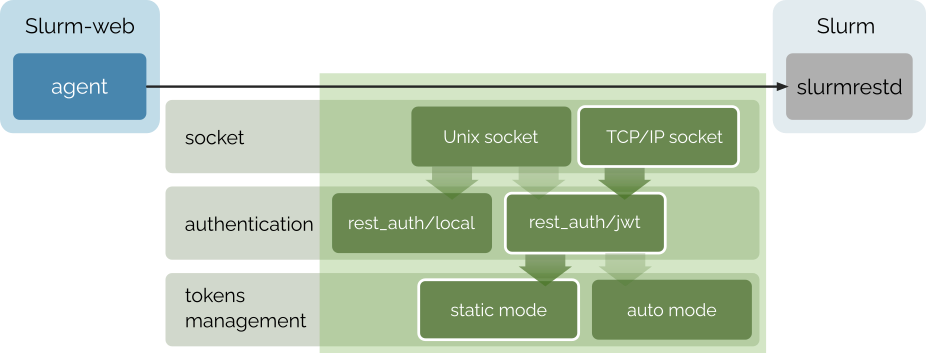
With jwt authentication method, the client must provide user and token in HTTP
headers. Then, slurmrestd service forwards these credentials in RPCs to
slurmctld and slurmdbd which are responsible to check expiration and
signature of the token.
In this configuration, slurmrestd service and Slurm-web agent can run with
unprivileged system users.
Setup JWT authentication
Generate random Slurm JWT signing key with restrictive permissions:
# dd if=/dev/random of=/var/spool/slurm/jwt_hs256.key bs=32 count=1
# chown slurm:slurm /var/spool/slurm/jwt_hs256.key
# chmod 0600 /var/spool/slurm/jwt_hs256.key
Edit main Slurm and SlurmDBD configuration to enable JWT alternative authentication:
AuthAltTypes=auth/jwt
AuthAltParameters=jwt_key=/var/spool/slurm/jwt_hs256.key
Restart slurmctld and slurmdbd services to update configuration:
# systemctl restart slurmctld slurmdbdSetup slurmrestd
Create /etc/systemd/system/slurmrestd.service.d/slurm-web.conf
drop-in configuration override for slurmrestd service:
[Service]
# Unset vendor unit ExecStart and Environment to avoid cumulative definition
ExecStart=
Environment=
Environment="SLURM_JWT=daemon"
ExecStart=/usr/sbin/slurmrestd $SLURMRESTD_OPTIONS -a rest_auth/jwt [::]:6820
RuntimeDirectory=slurmrestd
RuntimeDirectoryMode=0755
User=slurmrestd
Group=slurmrestd
DynamicUser=yes
With DynamicUser=yes, systemd creates a transient slurmrestd system
user during the lifetime of the service and executes the daemon with this
unprivileged user.
|
Reload systemd units and enable the service:
# systemctl daemon-reload && systemctl enable --now slurmrestd.serviceSetup Agent
Generate a token with Slurm for slurm admin user:
# scontrol token lifespan=infinite username=slurm| In this example, we generate a token with an infinite lifespan to avoid its expiration and the requirement to update the token on a regular basis. You can also choose to generate tokens with a short lifespan and manage these updates. |
Copy the token in output and edit Slurm-web agent configuration file
/etc/slurm-web/agent.ini:
[slurmrestd]
uri=http://localhost:6820
jwt_mode=static
jwt_token=<secret_token>
Test Access
To test Slurm-web agent and slurmrestd service configuration parameters, you
can run slurm-web-connect-check
utility. It tries to send HTTP request to slurmrestd with Slurm-web agent
configuration parameters and reports the status. For example:
-
System packages
-
Docker
-
Podman
-
Compose
# slurm-web connect-check$ docker run --rm \
--user $(id -u slurm-web):$(id -g slurm-web) \
-v /etc/slurm-web/agent.ini:/etc/slurm-web/agent.ini:ro \
-v /var/lib/slurm-web:/var/lib/slurm-web \
ghcr.io/rackslab/slurm-web-agent:latest connect-check$ podman run --rm \
--userns=keep-id --user $(id -u slurm-web):$(id -g slurm-web) \
-v /etc/slurm-web/agent.ini:/etc/slurm-web/agent.ini:ro \
-v /var/lib/slurm-web:/var/lib/slurm-web \
ghcr.io/rackslab/slurm-web-agent:latest connect-check
With rootful Podman, omit --userns=keep-id.
|
$ LOCAL_UID=$(id -u) LOCAL_GID=$(id -g) docker compose run --rm agent connect-checkWith Podman Compose:
$ LOCAL_UID=$(id -u) LOCAL_GID=$(id -g) podman compose run --rm agent connect-checkWhen successful, the command prints:
✅ connection successful! (cluster: hpc, slurm: 25.11.0, api: 0.0.44)Restart agent
Upon successful test, restart agent service to apply changes:
-
Native service
-
Production HTTP server
-
Containers
-
Compose
When using default native service:
# systemctl restart slurm-web-agent.serviceWhen using production HTTP server:
# systemctl restart slurm-web-agent-uwsgi.serviceWhen using raw containers:
$ docker restart slurm-web-agentWith Podman:
$ podman restart slurm-web-agentWhen using the reference Compose stack:
$ LOCAL_UID=$(id -u) LOCAL_GID=$(id -g) docker compose restart agentWith Podman Compose:
$ LOCAL_UID=$(id -u) LOCAL_GID=$(id -g) podman compose restart agent