Custom Branding
Slurm-web lets sites customize the web portal appearance to match brand identity: colors, logos, and favicon. Branding is optional. When parameters are omitted, the default Slurm-web theme and assets are used.
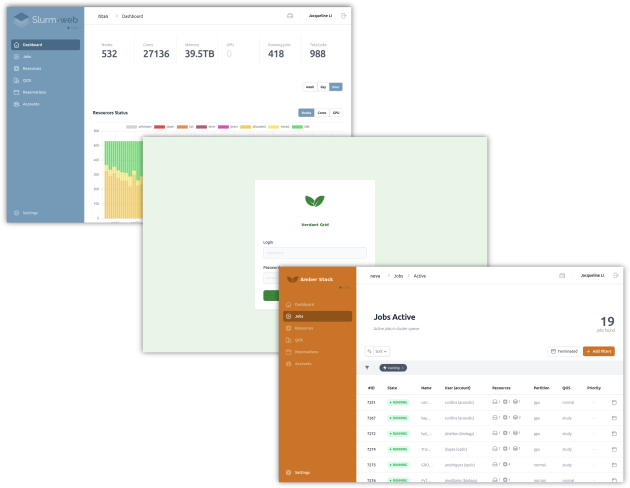
Settings
Colors
Six colors are used in the user interface. They can be customized by defining
six optional hexadecimal colors in [ui]:
| Parameter | Typical use |
|---|---|
|
Light page backgrounds (login), subtle highlights, tags |
|
Sidebar background, primary buttons, links, focus rings, selected controls (dashboard tabs, filters, resource diagram highlights) |
|
Button hover states, focus outlines |
|
Active sidebar entries, secondary text, dark-mode button backgrounds |
|
Active navigation in dark mode, primary actions on dark backgrounds |
|
Inactive sidebar menu labels and icons on the main brand background |
All color parameters are optional. Define only those you need to override.
Pick a coherent palette: color_main is the dominant brand fill;
color_darker and color_dark should be progressively darker for hovers and
active states; color_light and color_font_disabled should remain readable on
top of color_main (the sidebar uses both).
|
Logos
Four optional PNG logos cover light and dark contexts for the login page and the sidebar.
| Parameter | Context | Notes |
|---|---|---|
|
Login page, light mode |
Portrait layout, about 140×160 pixels; transparent background recommended |
|
Login page, dark mode |
Same size as |
|
Sidebar, light mode (on |
Wide layout, about 280×64 pixels; use dark tones for contrast on the sidebar |
|
Sidebar, dark mode |
Same size as |
When not defined, the default Slurm-web logo is used for each slot.
Set logo_alt to the text read by screen readers for all custom logos, for
example your organization or portal name). When not defined, Slurm-web is used.
|
File layout
Store branding assets (logos, favicon) in a dedicated directory, for example
/etc/slurm-web/branding/:
/etc/slurm-web/branding/
├── logo_login.png
├── logo_login_dark.png
├── logo_horizontal.png
├── logo_horizontal_dark.png
└── favicon.ico
Reference these paths in the [ui] section of gateway.ini.
Example configuration
The following excerpt shows a minimal branding setup in
/etc/slurm-web/gateway.ini:
[ui]

color_main=#486a86
color_dark=#3b5163
color_light=#ccdbe6
logo_login=/etc/slurm-web/branding/logo_login.png
logo_login_dark=/etc/slurm-web/branding/logo_login_dark.png
logo_horizontal=/etc/slurm-web/branding/logo_horizontal.png
logo_horizontal_dark=/etc/slurm-web/branding/logo_horizontal_dark.png
favicon=/etc/slurm-web/branding/favicon.ico
logo_alt=My HPC Portal
A fuller example with commented parameters is available in the gateway configuration example.
See also
-
Gateway
[uisection] — full parameter reference -
Service Messages — custom markdown below the login form